

If you let out property in the UK and your gross rental income exceeds £50,000, the clock is ticking. From April 2026, Making Tax Digital for Income Tax Self Assessment (MTD for ITSA) becomes mandatory, and landlords who ignore it face a new points-based penalty system, missed deductions, and avoidable stress. The good news is that digital compliance is far less daunting than it sounds. This guide walks you through every stage: who must comply, how to set up digital records, how to submit quarterly updates, how to claim every legitimate expense, and how to sidestep the traps that catch landlords out.
Table of Contents
- Understanding landlord obligations under Making Tax Digital
- Setting up digital records and software for tax compliance
- How to complete and submit quarterly updates and final declarations
- Maximising allowable expenses and avoiding common traps
- Penalties, points, and pain: How to avoid MTD compliance pitfalls
- A smarter approach: Why savvy landlords embrace digital tax now
- Get ahead: The right tools for landlord tax compliance
- Frequently asked questions
Key Takeaways
| Point | Details |
|---|---|
| Know your MTD start date | Landlords with income over £50,000 must comply from April 2026, with upcoming lower thresholds. |
| Choose digital software early | Selecting and using MTD-compatible tools simplifies submissions and cuts down on admin errors. |
| Track all income and expenses | Accurate digital records ensure you claim every deduction and avoid compliance penalties. |
| Avoid penalties with reminders | Set up quarterly and annual alerts to stay on top of MTD reporting deadlines. |
Understanding landlord obligations under Making Tax Digital
MTD for ITSA is not optional for landlords who meet the income threshold. MTD for ITSA requires landlords with qualifying gross income over £50,000 from April 2026 to keep digital records and submit quarterly updates to HMRC. The threshold drops to £30,000 from April 2027, and a further reduction to £20,000 is expected from April 2028.
What counts as qualifying income? Qualifying income includes gross rental income and self-employment turnover, with special rules for joint ownership. If you co-own a property, each owner's share of the gross income counts separately toward their individual threshold. You report your share on form SA105 box 20.
Here is a quick overview of the rollout timeline:
| Tax year | Income threshold | Who is affected |
|---|---|---|
| 2026/27 | Over £50,000 | Landlords and sole traders |
| 2027/28 | Over £30,000 | Broader self-employed group |
| 2028/29 | Over £20,000 | Near-universal coverage |
Some landlords are exempt or deferred:
- Below-threshold landlords do not need to comply until their income crosses the relevant limit.
- First-year exemption applies in certain circumstances where income only recently exceeded the threshold.
- Digital exclusion is available for those who genuinely cannot use digital tools, subject to HMRC approval.
To illustrate: if you earn £35,000 in rental income and £18,000 from freelance work, your combined qualifying income is £53,000. You must comply from April 2026. If your rental income alone is £28,000 and you have no other self-employment, you wait until the 2027 rollout.
Pro Tip: If you are planning a new property purchase or considering when to start letting, timing can affect which tax year your income first crosses a threshold. Explore your digital obligations for landlords before you commit to a letting start date.
Understanding your obligations early gives you time to choose the right software and avoid a last-minute scramble. Read more about MTD digital submission requirements to see exactly what HMRC expects from your records.
Setting up digital records and software for tax compliance
Having established who must comply, the next challenge is setting up the right digital systems. This is where many landlords stall, but the process is straightforward when broken into steps.
Step-by-step setup:
- Choose MTD-compatible software that is approved by HMRC and suits landlords specifically.
- Link your bank accounts using open banking or import statements manually (noting that manual copy-paste between systems is prohibited).
- Create a property record for each letting, then enter your first income and expense transactions.
- Categorise each entry correctly: rental income, repairs, insurance, mortgage interest, and so on.
- Store supporting documents such as receipts and invoices digitally, linked to each transaction.
Digital records must include date, amount, and description for each transaction. Manual copy-paste between systems is prohibited under the digital link rule, meaning your data must flow digitally from source to submission.

Here is how popular options compare for landlords:
| Software | Landlord-specific features | MTD-ready | Price range |
|---|---|---|---|
| VoxaMTD | Section 24 calculator, AI categorisation, receipt scanner | Yes | Free to £40/month |
| Hammock | Property-focused dashboard | Yes | Paid |
| Xero | General accounting, add-ons needed | Yes | Paid |
| QuickBooks | Broad features, less landlord-specific | Yes | Paid |
Examples of HMRC-compatible software include Xero, QuickBooks, and Hammock for landlords, but specialist platforms built around property income tend to reduce errors significantly.
Common pitfalls to avoid:
- Incomplete entries: missing a description or date can invalidate a record.
- Loss of supporting documents: a receipt stored only in a physical folder does not satisfy the digital link rule.
- Mixing personal and property finances: keep a dedicated account or clearly tag transactions.
Pro Tip: Use landlord-focused software with automatic bank feeds. It removes the temptation to copy-paste data and ensures every transaction is captured in real time. Good digital bookkeeping tips can save hours at quarter-end.
How to complete and submit quarterly updates and final declarations
With digital records in place, you will be ready to tackle the submission workflow itself. Quarterly updates are not full tax returns; they are cumulative summaries of your income and expenses for each quarter.
The four quarterly deadlines are:
- Quarter 1: 6 April to 5 July, due by 7 August
- Quarter 2: 6 July to 5 October, due by 7 November
- Quarter 3: 6 October to 5 January, due by 7 February
- Quarter 4: 6 January to 5 April, due by 7 May
Quarterly updates are cumulative summaries due within one month of each quarter-end, with a final declaration by 31 January following the tax year.
Each quarterly update should include:
- Gross rental income received in the period
- Allowable expenses categorised correctly
- Property details if you have multiple lettings
- Adjustments for prior-period corrections
The annual final declaration is more involved. It pulls together all property income, any self-employment income, and personal income such as dividends or savings interest. This replaces the traditional Self Assessment return.
Key insight: Joint owners can use easements for reporting, and landlords with turnover below £90,000 can consolidate expenses rather than itemising every category. This simplifies reporting considerably for smaller portfolios.
New landlords who start letting mid-year only report from their first letting date, not from 6 April. Joint owners each submit their own updates based on their income share.
Pro Tip: Set four calendar alerts now, one for each quarterly deadline. Add a fifth for 31 January. Missing a single deadline starts the points clock. Review MTD tax deadlines to confirm the exact dates for your circumstances, and read up on UK tax digitisation to understand the broader context.
Maximising allowable expenses and avoiding common traps
Accurate reporting is crucial, but maximising what you claim is just as vital. Many landlords leave money on the table simply because they are unsure what qualifies.
Top allowable expenses for landlords:
- Repairs and maintenance (not improvements)
- Mortgage interest, subject to Section 24 restrictions
- Buildings and contents insurance
- Letting agent and management fees
- Replacement of domestic items (furniture, appliances)
- Digital recordkeeping software costs
- Accountancy and professional fees
- Ground rent and service charges
Unusual but valid claims that landlords often miss include the cost of travelling to inspect a property, advertising costs for finding tenants, and subscriptions to landlord associations.
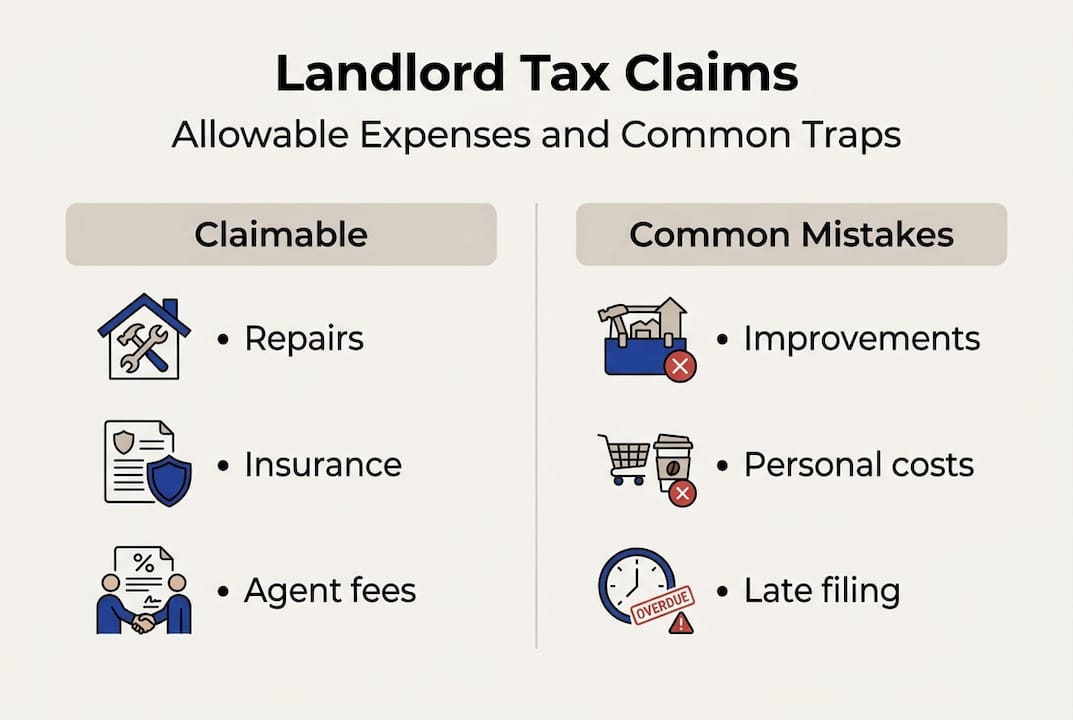
| Expense type | Claimable | Common mistake |
|---|---|---|
| Repairs | Yes | Claiming improvements instead |
| Mortgage capital repayment | No | Confusing with interest |
| New furniture (replacement) | Yes | Forgetting to claim at all |
| Legal fees for new lease | Yes | Overlooking as a capital cost |
Many landlords underclaim deductions, with a third missing out on repairs and maintenance claims. That is a significant amount of tax overpaid every year.
The biggest traps are:
- Capital versus revenue confusion: replacing a broken boiler is revenue (claimable now); installing a new extension is capital (different rules apply).
- Double-claiming: claiming the same expense in two categories or two tax years.
- Insufficient evidence: HMRC can disallow any claim without a dated receipt or invoice.
"The quality of your records is your first line of defence in any HMRC enquiry. A well-kept digital record prevents penalties and protects every claim you make."
For a deeper look at what you can legitimately claim, the tax tips for landlords resource covers edge cases and planning opportunities in detail.
Penalties, points, and pain: How to avoid MTD compliance pitfalls
Claiming expenses is rewarding, but only if you avoid costly compliance mistakes. HMRC has introduced a points-based penalty system that works like penalty points on a driving licence.
How the points system works:
- Each late quarterly submission earns 1 penalty point.
- Reaching 4 points triggers a £200 fine.
- Points reset after a sustained period of compliance.
- Payment penalties escalate: 1 point per late submission, with a £200 fine at 4 points, and payment penalties escalating after 16 or more days overdue.
| Scenario | Points earned | Financial penalty |
|---|---|---|
| 1 late quarterly update | 1 point | None yet |
| 4 late quarterly updates | 4 points | £200 fine |
| Payment 16+ days late | N/A | Percentage-based fine |
| Payment 31+ days late | N/A | Higher percentage fine |
The soft landing in 2026 to 2027 means no points are awarded for late quarterly submissions, but late payments are still penalised. Do not mistake this grace period for a free pass; it applies only to filing, not to what you owe.
Practical strategies to stay compliant:
- Use software with built-in compliance alerts and deadline reminders.
- Reconcile your records monthly rather than scrambling at quarter-end.
- Keep a separate folder for each property's receipts and invoices.
- Review HMRC's Making Tax Digital role to understand what HMRC can see and when.
Pro Tip: Treat the soft landing as a practice run, not a holiday. Landlords who build good habits now will find the 2027 and 2028 rollouts effortless. Check digital tax deadlines to map out your compliance calendar today.
A smarter approach: Why savvy landlords embrace digital tax now
The dominant narrative around MTD is one of burden: more admin, more software costs, more complexity. We think that framing is wrong, and the evidence backs us up.
Landlords who adopted digital bookkeeping early consistently report fewer errors at year-end, faster reconciliations, and a clearer picture of their actual profit per property. When you can see exactly what each letting costs and earns in real time, you make better decisions about rent levels, maintenance timing, and portfolio growth. That is genuinely valuable, not just a compliance exercise.
The rise in landlord incorporations also signals a shift: more landlords are rethinking their entire tax strategy, not just ticking boxes. Digital records make that kind of planning far easier because your data is already organised and accessible.
Our strong advice is to test your chosen software before the April 2026 deadline. A few months of voluntary use will surface any gaps in your record-keeping before they become penalty points. Follow the digital tax trends guide to see where the regulatory landscape is heading and position yourself ahead of the curve.
Get ahead: The right tools for landlord tax compliance
Ready to act? The right support can make digital tax reporting effortless.
VoxaMTD is a free, HMRC-recognised platform built specifically for landlords navigating MTD. It connects directly to HMRC via production API, imports your bank transactions automatically through open banking, and uses AI to categorise every expense. The landlord dashboard includes a Section 24 mortgage interest calculator and capital allowances tracking, so you claim every pound you are entitled to. Alex AI Accountant is available 24/7 to answer your tax questions by voice, and the Professional tier gives you a real human accountant for quarterly reviews. Start with free MTD landlord software today, or explore the full range of features at VoxaMTD for digital tax.
Frequently asked questions
When does Making Tax Digital apply to landlords?
MTD rollout dates confirm that from 6 April 2026, MTD applies to UK landlords with qualifying gross income over £50,000, with lower thresholds of £30,000 from 2027 and £20,000 expected from 2028.
What expenses can landlords claim under MTD?
Landlords can claim property repairs, mortgage interest within Section 24 limits, buildings insurance, letting agent fees, and digital recordkeeping costs as allowable expenses.
What happens if I file my quarterly update late?
Each late submission earns one penalty point, and four points trigger a £200 fine, though the 2026 to 2027 soft landing period means no points are awarded for late quarterly filings in that first year.
Do I need special software to comply with MTD?
Yes, you must use HMRC-compatible software such as Xero, QuickBooks, or a specialist landlord platform to maintain digital records and submit updates directly to HMRC.